

Moving In: Fall 2024
Upcoming Q&A Webinars
Have questions? Join us for an virtual information session and Q&A. Register here:
For more information, visit Housing Webinars.
Western Welcome Team Volunteers
Have you signed up to volunteer with the Western Welcome Team yet? Move in early, receive WWU swag & meals, and connect with fellow students during Fall Move-in. For more information, visit Western Welcome Team. Sign-up by August 23!
Building & Room Access
At check-in you will receive a set of keys and/or fob that gives you access to your community, building, room and mailbox. You are financially responsible for your keys/fobs. Lost or damaged keys/fobs create a security risk to you and your community and must be reported to your front desk immediately.
Arrival Process
- Before arriving, make sure to sign-up for a move-in timeslot (starting August 16; you will be emailed instructions). Timeslots will only be available to students who have received their room assignment.
- Official Fall Quarter 2024 Move-in is scheduled for Thursday, Sept. 19 - Sunday, Sept. 22, 2024. Early arrival may be an option if you are in a special program (follow your program's specific arrival instructions).
- Come prepared with a government issued photo ID and your building/room number.
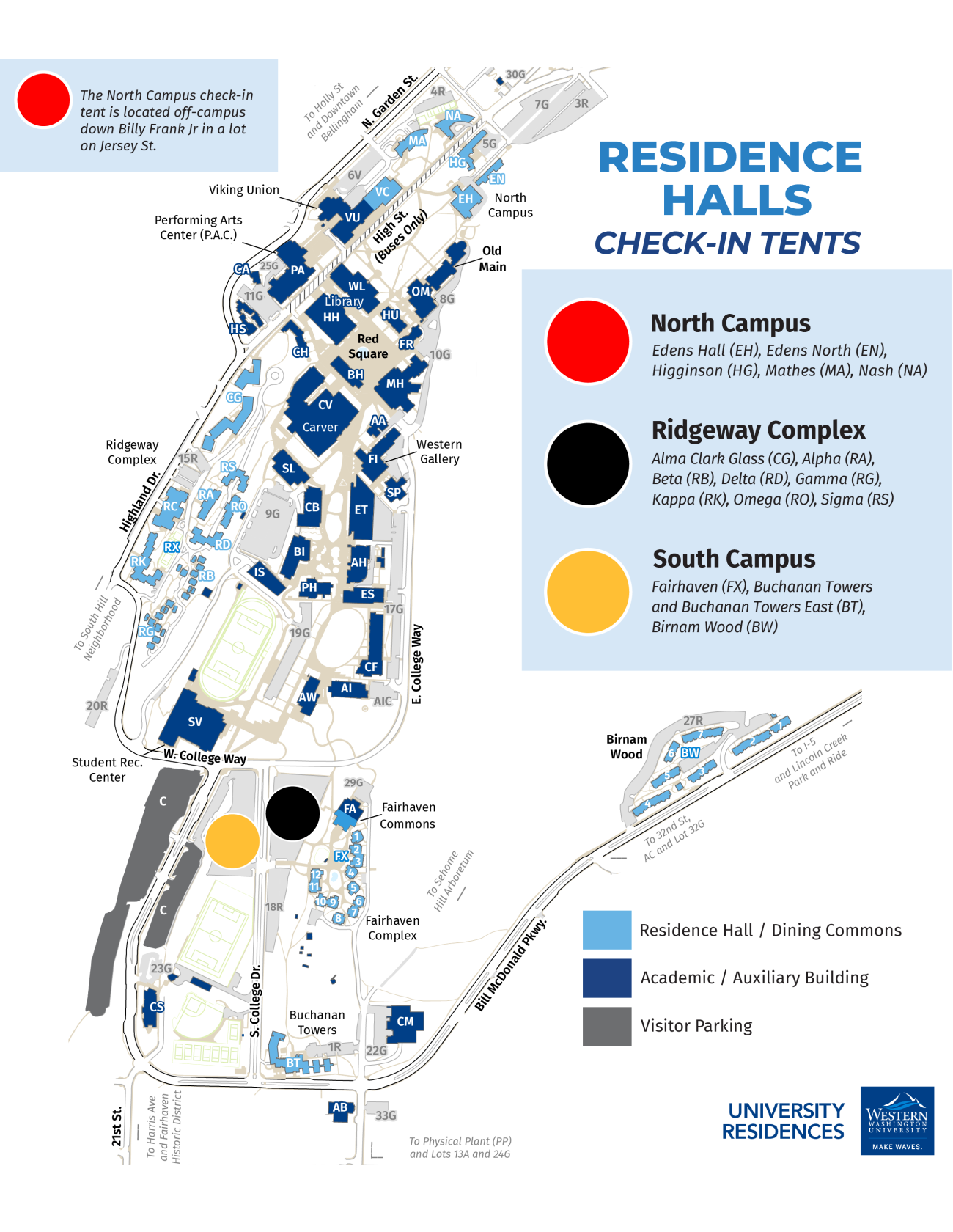
- Follow our specific directions (see below) to guide you to your community's check-in tent (North, Ridgeway, or South). There may be a car line to wait in before you arrive at your check-in tent, so only cars that have been in line are allowed to check-in. Waiting here can be 20 minutes to several hours, so come prepared with patience, snacks, and your cell phone.
- Depending on your community, you may receive a car tag (North & Ridgeway).
- While in the car queue, a staff member will approach your car and ask for your student ID, check you in, and provide you with your keys and/or fob. You will not need to get out of the car.
- After receiving your keys, staff members will direct you to your building unload zone. At the unload zone, our crew of move-in volunteers help unload your car. For North & Ridgeway buildings, a vehicle tag is required in the unload zone. Please note: you must leave one person with your vehicle at all times.
- Once your vehicle is unloaded, move it to one of the C-lots for long-term parking.
- Return to your hall to set up your room, meet your hall staff, and connect with other students!
- If you arrive after-hours to check-in, contact your building’s RA On-Call number (posted around the hall).
Community Check-in Tents
There will be three check-in tents: North, Ridge, and South. You will check in at your building's tent and receive your keys and/or fob. Review the information below for our specific directions to arrive at your check-in tent!
- North Buildings: Edens Hall, Edens North, Higginson, Mathes, Nash
- Ridge Buildings: Alma Clark Glass Hall, Alpha, Beta, Delta, Gamma, Kappa, Omega, Sigma
- South Buildings: Fairhaven, Buchanan Towers & Buchanan Towers East, Birnam Wood
Directions
North Campus Check-in
Northbound on I5
- Take Exit 253 (Lakeway Dr)
- Turn right onto King St
- Turn right onto Lakeway Dr
- Continue on Lakeway Dr for .5 miles
- Bear right onto E Holly St
- Turn left onto Billy Frank Jr. St
- Turn left onto East Chestnut St
- Turn right onto Jersey St
- Follow signs and staff direction to your building's car queue
Southbound on I5
- Take Exit 253 (Lakeway Dr)
- Turn right onto Lakeway Dr
- Continue on Lakeway Dr for .3 miles
- Bear right onto E Holly St
- Turn left onto Billy Frank Jr. St
- Turn left onto East Chestnut St
- Turn right onto Jersey St
- Follow signs and staff direction to your building's car queue
Ridgeway Check-in
Northbound on I5
- Take Exit 252 (Samish Way, W Wash University)
- Turn left at stop sign onto Samish Way
- Turn left at light onto S Samish Way
- Turn left at light onto Bill McDonald Pkwy
- Continue on Bill McDonald Pkwy for 1 mile
- Follow signs and staff direction to your building's car queue
Southbound on I5
- Take Exit 252 (Samish Way, W Wash University)
- Turn right onto Samish Way
- Turn left at next light onto Bill McDonald Pkwy
- Continue on Bill McDonald Pkwy for 1 mile
- Follow signs and staff direction to your building's car queue
South Campus Check-in
Northbound on I5
- Take Exit 252 (Samish Way, W Wash University)
- Turn left at stop sign onto Samish Way
- Turn left at light onto S Samish Way
- Turn left at light onto Bill McDonald Pkwy
- Follow signs and staff direction to your building's car queue
Southbound on I5
- Take Exit 252 (Samish Way, W Wash University)
- Turn right onto Samish Way
- Turn left at next light onto Bill McDonald Pkwy
- Follow signs and staff direction to your building's car queue
Don't Get a Parking Ticket
When you are finished unloading, move your car to one of the WWU parking lots:
- Free parking available: C lot
- Pay to park: 6V, 7G and 14G lots
Here's how to get to popular destinations from Western on the bus:
- Lakeway Center, including Lakeway Fred Meyer, catch Routes 190 or 196 from the Viking Union
- Sehome Village, including Haggen and Rite Aid, catch Routes 105, 107, 190 or 196 from the Viking Union
- Fairhaven (restaurants, shops, trails, etc.), catch Routes 14 or 105 from the Viking Union
- Downtown (restaurants, shops, trails, etc.), catch Routes 14, 105, 108, 190 or 197 from Haggard Hall
- To get to Target at Bellis Fair Mall, first go to downtown’s Bellingham Station (on Routes 14, 105, 108, 190 or 197 from Haggard Hall). From Bellingham Station, transfer to Routes 15 or 331.
- To get to Costco or Bakerview Fred Meyer, first go to downtown’s Bellingham Station (on Routes 14, 105, 108, 190 or 197 from Haggard Hall). From Bellingham Station, transfer to Route 50.
Questions? Visit www.ridewta.com. Plan your trip and track your bus in real time using BusTracker.
After Hours Arrivals
If you are arriving outside of posted move in times, go to your community desk. If the building is closed call the number posted outside for the RA on call for assistance checking in.
Free Bus Rides With Your Student ID!
Consider traveling all weekend on foot, by bike and by WTA bus. Your student I.D. card is your WTA bus pass. Family members can pay $1 cash per ride or pay via mobile app. This short video gives an overview of bus service to Western, and here are some general notes about riding WTA.
Resident Checkout Program
Before you buy, check out for free! Western’s Resident Checkout Program offers on-campus residents free short- and long-term checkouts of residence hall essentials, games, cleaning supplies, and more. For more information about current inventory and 2024-25 reservations, visit the RCP website.
Bed Options
- Twin XL sheets will fit any of our mattresses on campus.
- Rooms are configured as high singles with the exception of triple rooms which require lofts.
- For disability accommodation, contact the Disability Access Center.
- For more information, visit Bed Options.
Suggested Essentials
- Approved appliances: electric tea kettles, coffee makers, blenders, electric fans, air purifiers, rice cookers, microwave ovens up to 900w, mini-fridges no larger than 4.5 cubic feet.
- Clothing: plan for rain, snow and sun; bring warm layers, sensible shoes, rainproof jacket with hood, warm coat, waterproof boots, scarf, hat and gloves.
- Emergency kit with rechargeable flashlight
- Environmentally-friendly cleaning supplies
- Flashlight: plan for shorter daylight hours in the winter.
- Laundry gear: laundry bag, hamper or basket, detergent, hangers.
- Linens: extra-long twin sheets, mattress pad or topper, pillows, blankets, comforter, sleeping bag, towels.
- Medical: prescription medications, pain reliever, cold remedies, tissue, thermometer, antacid, allergy medicine.
- Official documents required for employment: Social Security card, passport, driver’s license, birth certificate.
- Personal technology: laptop, tablet or desktop computer, USB-connected printer, game console, TV, fire-safe surge protector.
- Security items: fireproof lockbox or locking storage chest, laptop cable lock.
- Storage: food, dishware, clothing, hangers, outdoor gear.
- Toiletries: shower caddy and bathroom supplies.
- Travel toolkit: half-inch socket wrench for bunking or lofting your bed.
- Face Coverings
Prohibited Items
- Firearms or weapons
- Flammable materials or explosives
- Hazardous appliances: electric hotplates, burners, toasters and toaster ovens (allowed in suites with kitchenettes), space heaters, electric blankets, halogen lamps over 300w, hover boards, any appliance that is not UL approved.
- Non-university beds or accessories
- Pets are prohibited, but fish in tanks under 10 gallons are allowed. Assistance animals are not considered pets.
- Wireless Routers
Assistance Animals
If you plan to bring a service dog or an emotional support animal, see Animals in Residence.
Connecting to the Internet
WiFi is provided throughout the residence halls and is included in your room rate.
Wireless routers are prohibited on our network. You can access the Internet through WWU WiFi using your universal login.
Note: wireless printers connected to our network can be seen and possibly used by other students. For more information, visit: restek.wwu.edu/get-online/other-devices.
Tech Support
Residential Technology Services (ResTek) provides technology education and support by phone and email on issues concerning Internet connectivity, game consoles and copyright law. For more information, visit ResTek.
Residential Computer Labs
Each community has access to a 24-hour computer lab.
Residential Dining Commons
- North Campus: Viking Commons
- Ridgeway: Ridgeway Commons
- South Campus: Fairhaven Commons
Visit Dine On Campus and/or download the app for dining commons hours, menus, events, and more!
Each residential meal plan comes with a quarterly allowance of meal swipes plus Dining Dollars (for use at any retail dining locations). Meals are available at any dining commons: swipe your Western ID card when you enter the commons and one all-you-care-to-eat meal will be deducted from your dining balance. Unused meals expire at the end of the quarter.
Dining Dollars may be spent in any of the campus cafés, markets, or dining commons and carry over from one quarter to the next. Meal plan changes can be made by visiting Dine On Campus. Upgrades are accepted anytime, and downgrades are accepted through the second Friday of each quarter.
- Apartment residents can purchase an optional meal plan at dineoncampus.com/WWU.
If you are living with food allergies, you are familiar with managing your health and wellness. Western works hard to provide the tools you need to maximize your dining experience on campus. We encourage you to meet with our registered dietitian and executive chef when you arrive on campus.
Room and board are billed to your student account before the start of each quarter, and your student account is accessible through MyWestern. Housing and meal plan rates are available at Financial Information.
The term of the Housing Agreement is the length of the academic year, or remainder thereof if you moved in midyear. Termination of occupancy before the last week of spring quarter may result in checkout penalties and a contract breakage fee. For more information, visit Housing Agreement.
As a member of the residential community, you are responsible for understanding and abiding by the residential policies and procedures, including the Housing Agreement, the Community Standards and Conduct Procedures. Before you move in, take the time to get familiar with the policies and procedures at Policies & Procedures.
Students wishing to change rooms may initiate a transfer request through the MyHousing portal no sooner than the second week of the quarter. Transfer requests may take several weeks or longer to process depending on available housing and resident requests. For more information, visit Transferring Rooms.
Once you register for classes, you are eligible for an official Western ID card. Your card covers:
- WWU official photo ID
- Swipe-access to your meal plan and Dining Dollars
- Student bus pass and shuttle
- Rec Center access
- Athletic events
- Library Services
For more information on Western Card, visit westerncard.wwu.edu.
Laundry Facilities
Each residential community is equipped with energy-efficient front-loading washers and dryers. Laundry is included in your room cost. No laundry card, coins or tokens are required.
Housekeeping
Residents are responsible for the regular cleaning of their room, suite or apartment, including the proper disposal of trash and recyclables. Toilet paper is provided in the residence halls; Birnam Wood residents must provide their own toilet paper.
You and your suitemates are also responsible for cleaning your bathroom. Environmentally friendly cleaning products are strongly encouraged.
Please note: suite-style bathrooms will be cleaned once per month.
Custodial staff clean your bathroom daily if you live in a building with community bathrooms.
Custodians clean and disinfect public spaces at least three times per day.
Standard Amenities
Every room comes with WiFi, window coverings, a recycle bin, compost bucket and trash can. Standard furnishings for each student include: dresser or built-in drawers, closet or wardrobe for hanging clothes, a desk and a chair.
Bringing a Car?
Make sure to sign up for a parking permit prior to arrival. Visit the Parking Portal for more information.
Bicycles
Racks designated for bicycle storage are provided throughout campus and within each residential community. Bicycles stored anywhere else are subject to impound. To see the type of bike storage available in your building, go to Explore the Buildings. We also encourage you to register your bike with University Police.
Keep Your Stuff Safe
The University assumes no responsibility for loss or damage to your personal property from any cause. We strongly recommend you obtain Student Property Insurance or request Renters Insurance through your family insurance company.
Official Communication
Your WWU email is the University’s official method of communication. Housing staff regularly send official, time-sensitive communication by email. You are accountable for all information sent to your student email. You may set up email forwarding to redirect your Western email to a personal email account.
Receiving Mail & Packages
To ensure your mail successfully reaches your residence hall, address mail and packages as presented below, using your official first and last name. You should always use trackable, insured options when mailing cash or anything of value. When tracked items arrive, pickup notice is sent to your university email account.
For more details on resident mail, visit Mail & Deliveries.
Shipping Items Before You Arrive
It may be practical to ship some of your belongings in advance, especially if you are coming from another state or country.
Your Full Name
516 High Street
Hall Name + Room Number
Bellingham, WA 98225
- Packages are accepted a maximum of seven days prior to your arrival; any packages sent more than seven days in advance, may be returned to sender.
- To ensure proper delivery, address the package in the format presented above and use trackable insured options.